

如何在 WEEX Exchange 上啟用雙重因素驗證 (2FA):逐步指南

為加強您帳戶的安全性,請在 上啟用雙重因素驗證 (2FA) WEEX上啟用雙重因素驗證 (2FA) 是必要的。 這個額外的保護層確保只有您才能存取您的帳戶,在交易和提款時提供額外的安全性。
為什麼 2FA 在 WEEX 上很重要?
2FA 增加了第二層安全性,除了密碼之外,還需要在您的行動裝置上(透過 Google Authenticator 或 Authy 等驗證器應用程式)產生密碼。 它可防止未經授權的存取,即使您的密碼已外洩。
在 WEEX 上設定 2FA 的逐步指南
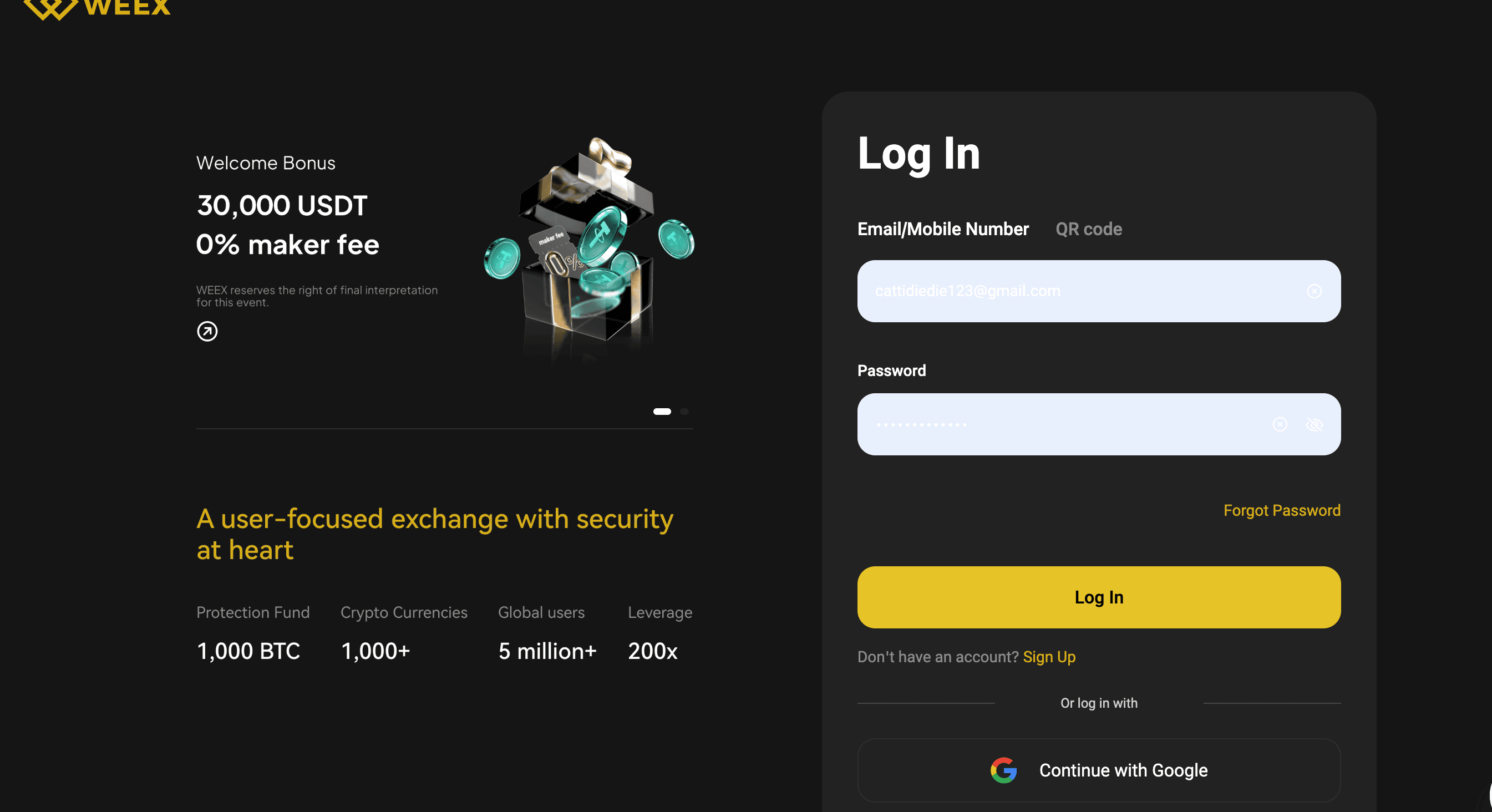
步驟 1:登入您的 WEEX 帳戶
瀏覽官方 WEEX Exchange 網站並使用您的憑證登入您的帳戶。 確保您是在官方網站,以避免釣魚詐騙。
步驟 2:存取帳戶設定
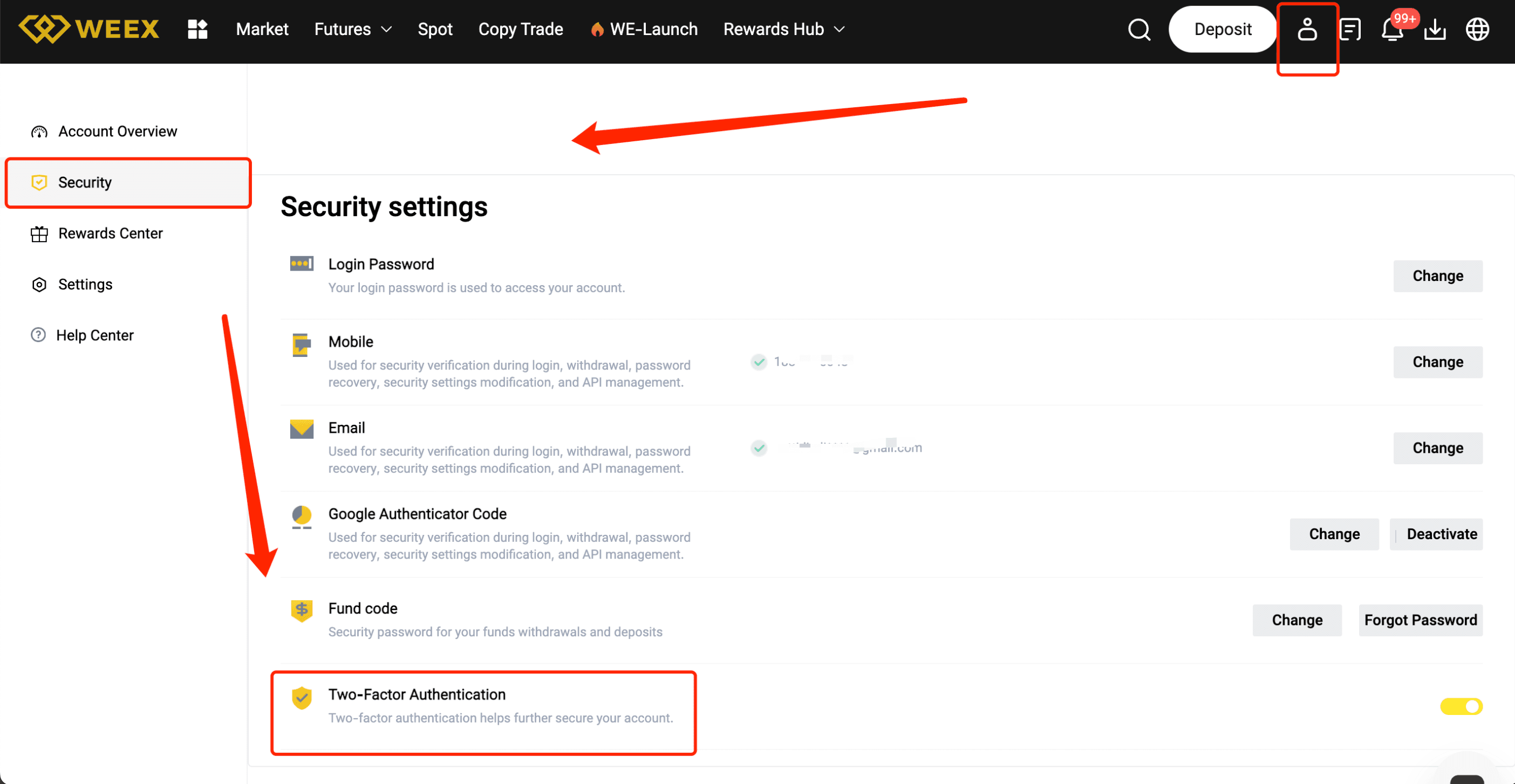
登入後,按一下右上角的頭像或使用者名稱,即可瀏覽您的個人資料設定。 從下拉式功能表中選擇「安全性設定」或「2FA 設定」。
步驟 3:選擇您的 2FA 方法
您將會看到幾個啟用 2FA 的選項。 最常見的方法是使用驗證器應用程式。 選擇「透過應用程式啟用 2FA」(例如 Google Authenticator 或 Authy)。
步驟 4:掃描 QR碼
開啟您選擇的驗證器應用程式,選擇 「新增帳戶」 或 「掃描 QR 碼」。 使用應用程式掃描 WEEX 網站上顯示的 QR 代碼。 這會將您的帳戶與應用程式連結。
步驟 5:輸入驗證碼
掃描 QR 碼後,驗證器應用程式會產生一個 6 位數的驗證碼。 將此代碼輸入 WEEX 網站進行驗證並完成設定。
步驟 6:備份密碼
完成 2FA 設定後,WEEX 會提供備份密碼。 請記下這些代碼,並將它們存放在安全的地方,因為如果您無法存取驗證器應用程式,這些代碼可用來存取您的帳戶。
步驟 7:確認並完成
再三檢查詳細資料,然後按一下 「確認」 或 「啟動」。 您的 2FA 將會啟用,為您的帳戶增加一層額外的安全性。
順利設定 2FA 的專業秘訣
- 使用可靠的驗證器應用程式,例如 Google Authenticator 或 Authy。
- 安全地保存您的備份代碼,以防您無法存取裝置。
- 使用強大的 PIN 或密碼,確保您的行動裝置安全。
- 不要與任何人分享您的 2FA 代碼,這是為了保護您。
在 WEEX 上完成 2FA 的優點
- 增強安全性:透過額外的驗證層保護您的帳戶,防止未經授權的存取。
- 更高的信任度:透過顯示您已採取措施保障資金安全,增加對您帳戶和活動的信任。
- 交易更安全:啟用 2FA,可保護您的交易和提款不受未經授權的行為影響。
結論
在 WEEX 上啟用 2FA 是一種簡單但功能強大的方式,可確保您帳戶的安全並保護您的資金。 透過遵循本指南,您可確保您的帳戶獲得更多一重的安全保障。 立即啟用 2FA,讓您在交易時更安心!
猜你喜歡
Global Overwatch Protocol (GOP) 協議代幣能漲到 1 美元嗎?2026年完整指南
共和黨真的能將票價降至1美元嗎?
AMD股票在五月:人工智慧的反彈仍然值得追逐嗎?
AMD股票在強勁的人工智慧需求下接近歷史高位。回顧2026年第一季的收益、估值、分析師目標和主要風險。
介紹 Circle Internet Group 代幣化股票(Ondo)($CRCLon):Onchain Circle 風險敞口與價格預測
CRCLon 是 Ondo 推出的 Circle 代幣化股票包裝產品,憑藉其鏈上股權訪問功能、快速的敘事輪動以及對 CRCL 故事的直接參與,吸引了廣泛關注。
介紹 Billions 網絡 ($BILL):人工與人工智能驗證基礎設施及價格預測
Billions Network 是一個融合人類與人工智能的信任層,其代幣推出、交易所上線交易以及以實用性為導向的身份敘事,使其備受矚目。
BILL Crypto Airdrop:分享 30,000 USDT,享 0 手續費交易並解鎖多重獎勵!
在加密貨幣市場迅速波動的今天,Billions Network (BILL) 代幣的最新空投活動吸引了眾多投資者的目光。根據 CoinMarketCap 於 2026 年 5 月 5 日的數據,BILL 目前價格為 0.036906 美元,24 小時漲幅高達 35.96%,市值達到 9504…
什麼是 Apple (APPLE) 幣?
Apple (APPLE) 於近日在 WEEX 交易所正式上市,這款快速啟動的 meme 幣在 Solana 區塊鏈上發行,融入輕鬆樂趣和公益色彩。據報導,Apple 的靈感來自一隻在 TikTok 上走紅的小狐狸,引發了許多網友的關注。如果有興趣了解更多關於 Apple (APPLE) 的詳細信息,歡迎點擊鏈接進一步探索。 Apple (APPLE) 介紹…
2026 年 5 月 Billions Network (BILL) 幣值得投資嗎?市場分析與投資前景探討
Billions Network (BILL) 作為一個新興的加密貨幣項目,在 2026 年 5 月初展現出強勁的市場動能。根據最新數據,其價格為 0.036906 美元,24 小時上漲 35.96%,市值達到 9504 萬美元,24 小時交易量高達 1.1316 億美元,流通供應量為 24.2…
## WEEX Futures 首推 BILL USDT 永續合約,Billions Network (BILL) Coin 交易上線
WEEX 交易所即將上線 Billions Network (BILL) 永續合約,為加密貨幣愛好者帶來全新交易機會。根據 CoinMarketCap 數據顯示,BILL 當前價格約為 0.036906 美元,24 小時交易量高達 113,162,544 美元,市值則達 89,615,594 美元,展現強勁成長潛力(數據擷取於 2024-05-05)。這項 BILL…

Nio Inc (NIO) Coin 價格預測:2026年5月上漲2.12%後,是否能突破$7關卡?
Nio Inc (NIO) Coin 作為電動車巨頭蔚來的代幣化資產,最近在美股中國概念股廣泛上漲的背景下表現亮眼。根據金十數據報導,美股開盤前,NIO (NIO.N) 上漲3%,阿里巴巴 (BABA.N) 上漲2%,理想汽車 (LI.O) 上漲1%。截至2026年5月5日,NIO 現貨價格為$6.03,24小時交易量達$8,929萬美元,市值$150.9億美元,過去24小時上漲2.12%。其代幣化版本 Nio Inc (NIO) Coin 價格為$6.01,代幣化市值$7.935萬美元,24小時交易量$794.31,漲幅1.24%。資料來源自 CoinMarketCap。本文將分析…
Billions Network (BILL) Coin 價格預測:2026 年 5 月暴漲 35.96% 後,是否能衝破 $0.05 大關?
Billions Network (BILL) Coin 最近在加密貨幣市場掀起波瀾,憑藉其專注於去中心化金融和跨鏈應用的生態系統,吸引了大量投資者關注。根據 CoinMarketCap 數據,截至 2026 年 5 月 5 日,Billions Network (BILL) Coin 的當前價格為 $0.036906…
Pudgy Penguins (PENGU) Coin 價格預測:2026年5月上漲2.76%,能否突破0.01美元大關?
Pudgy Penguins (PENGU) Coin 最近在加密貨幣市場中引起關注,特別是其與NFT和社區驅動生態系統的緊密結合,讓它從眾多迷因幣中脫穎而出。根據CoinMarketCap數據,截至2026年5月5日,Pudgy Penguins (PENGU) Coin 的當前價格為0.006328美元,24小時內上漲2.76%,市值達到397.75百萬美元,24小時交易量為43.91百萬美元。這波漲勢可能來自整體市場回暖和社區活動的提振。本文將分析其短期和長期價格走勢,包括技術指標、支持阻力位和市場預測,幫助新手投資者把握機會。如果你想交易,可以查看 PENGU/USDT 交易對,WEEX作為一個可靠的加密貨幣交易平台,提供流暢的買賣體驗。 Pudgy Penguins (PENGU) Coin 的市場定位與投資價值 Pudgy Penguins…
XRP 與卡爾達諾:2026 年哪一個是更好的投資?
XRP 是銀行的機構級結算層;卡爾達諾是去中心化的智能合約平台,適用於去中心化應用和數位身份。
XRP 受益於監管透明度和現貨 ETF 流入;卡爾達諾為相信去中心化治理的人提供更高的非對稱收益。
XRP 在日內交易中具有更深的流動性;ADA 為波段交易者提供更具爆發性的走勢。
在 WEEX 上以低費用交易 XRP/USDT 和 ADA/USDT。
俄羅斯石油資產基金(ROAF)與原油期貨:主要區別
ROAF是一個概念性數字資產,監管較弱;原油期貨是在受監管的交易所上標準化的合約
原油期貨由真實商品市場支持;ROAF沒有實物資產支持
原油期貨承載市場和槓桿風險;ROAF承載平台運營風險、提現問題和價格操縱風險
要獲得真實的油價風險敞口,請在WEEX上交易受監管的期貨
在WEEX註冊以獲得高達30,000 USDT的歡迎獎勵
## 2026 年 Terra Classic (LUNC) Coin 值得投資嗎?深度分析與投資展望
Terra Classic (LUNC) Coin 在 2022 年經歷重大轉型後,至今仍吸引不少投資者關注。根據最新數據,截至 2026 年 5 月 5 日,LUNC 價格為 0.000097 美元,24 小時漲幅達 10.12%,市值約…
ROAF幣能否重現ROAR在Solana上的魔力?剖析俄羅斯石油資產基金的潛力與風險
在2026年4月底推出的Russian Oil Asset Fund (ROAF)幣,以俄羅斯石油主題為敘事,迅速吸引了Solana網路上的關注。這個代幣承襲了早前ROAR幣的熱門故事,但擁有更乾淨的代幣經濟學,包括零團隊代幣和零交易稅,以及已燒毀的流動性池。根據2026年5月5日的最新數據,ROAF的市值約為17.2萬美元,遠低於ROAR曾達到的120萬美元峰值。本文將探討ROAF是否能重複ROAR的魔力,包含短期與長期預測、技術分析,以及市場展望。如果你對Solana上的 meme幣感興趣,不妨透過探索WEEX上的熱門代幣來追蹤類似機會,我們將提供平衡的洞見,幫助你評估這類高風險資產。 KEY TAKEAWAYS ROAF擁有比ROAR更優化的代幣結構,可能帶來更大上漲空間,但流動性較薄增加波動風險。 雖然共享俄羅斯石油敘事,ROAF缺乏先發優勢,市場疲勞可能限制其爆發潛力。 短期內,ROAF有機會實現3-4倍增長,但百倍回報需重大催化劑如交易所上市。 風險高企,適合高風險偏好投資者;初學者應避免視其為穩定投資。 總結來看,ROAF是ROAR的「小弟」,更適合作為短期交易而非長期持有。 ROAF與ROAR的比較:代幣經濟學與市場表現剖析 ROAR幣在2026年4月初推出後,迅速攀升至約120萬美元市值,日交易量高達11.8萬美元,憑藉俄羅斯石油資產的 meme敘事在Solana上掀起波瀾。然而,根據2026年5月5日的提取數據,ROAR如今市值僅剩9.2萬美元,流動性幾近枯竭(僅963美元),且處於「殭屍狀態」,團隊持有15%代幣並有2%燃燒稅。相較之下,ROAF在晚些時候推出,市值約17.2萬美元,流動性達2.7萬美元,無團隊代幣、無稅,並已燒毀LP。這讓ROAF看起來更吸引人,正如加密分析師在CoinDesk的近期報告中指出:「乾淨的tokenomics能降低投資者疑慮,提升早期採用率。」 我們可以用一個簡單的比喻來理解:ROAR像是率先闖入派對的客人,搶盡風頭,但ROAF是晚到的那個,帶著更好的裝備卻面對已疲憊的賓客。數據顯示,ROAF的低起點市值提供更多上漲餘地,但其合約(4ne9S…pump)與ROAR(RoARruz…7dnF)的差異,凸顯了後者已喪失活力。 指標…
俄羅斯石油資產基金 (ROAF) 幣是什麼?
俄羅斯石油資產基金(Ticker: ROAF)最近已在 WEEX 上市交易,自 2026 年 5 月起用戶可以開始交易此對。在進入詳細內容之前,若您想深入了解有關該幣的更多信息,請點擊 [俄羅斯石油資產基金 (ROAF)] 欲獲取更詳細的資訊及未來趨勢。 俄羅斯石油資產基金 (ROAF) 簡介 俄羅斯石油資產基金是基於 Solana 區塊鏈的 speculat…
Russian Oil Asset Fund (ROAF) Coin 價格預測:2026年5月上漲17%後,會否突破0.01美元?
在2026年5月初,Russian Oil Asset Fund (ROAF) Coin 以其社區驅動的能源敘事在Solana區塊鏈上引起關注。根據CoinGecko的最新數據,截至2026年5月5日,其當前價格為0.005008美元,24小時內上漲17.27%,市值約400萬美元,24小時交易量約27.2萬美元。這個項目雖然沒有實體資產支持,但透過「Crude power, on-chain」的概念吸引了投機者。本文將分析其短期和長期價格展望,包括技術指標、市場因素和預測,幫助初學者了解潛在機會。如果你想探索像ROAF這樣的代幣,start crypto trading on WEEX 是一個可靠的平台,能讓你輕鬆入門。 Russian Oil Asset Fund…
如何購買 Billions Network (BILL)?
Billions Network (BILL) 於 2026 年 5 月 4 日啟動 TGE。了解如何在 DEX 上購買 BILL、如何選擇平台以及詳細的交易步驟。
Global Overwatch Protocol (GOP) 協議代幣能漲到 1 美元嗎?2026年完整指南
共和黨真的能將票價降至1美元嗎?
AMD股票在五月:人工智慧的反彈仍然值得追逐嗎?
AMD股票在強勁的人工智慧需求下接近歷史高位。回顧2026年第一季的收益、估值、分析師目標和主要風險。
介紹 Circle Internet Group 代幣化股票(Ondo)($CRCLon):Onchain Circle 風險敞口與價格預測
CRCLon 是 Ondo 推出的 Circle 代幣化股票包裝產品,憑藉其鏈上股權訪問功能、快速的敘事輪動以及對 CRCL 故事的直接參與,吸引了廣泛關注。
介紹 Billions 網絡 ($BILL):人工與人工智能驗證基礎設施及價格預測
Billions Network 是一個融合人類與人工智能的信任層,其代幣推出、交易所上線交易以及以實用性為導向的身份敘事,使其備受矚目。
BILL Crypto Airdrop:分享 30,000 USDT,享 0 手續費交易並解鎖多重獎勵!
在加密貨幣市場迅速波動的今天,Billions Network (BILL) 代幣的最新空投活動吸引了眾多投資者的目光。根據 CoinMarketCap 於 2026 年 5 月 5 日的數據,BILL 目前價格為 0.036906 美元,24 小時漲幅高達 35.96%,市值達到 9504…
什麼是 Apple (APPLE) 幣?
Apple (APPLE) 於近日在 WEEX 交易所正式上市,這款快速啟動的 meme 幣在 Solana 區塊鏈上發行,融入輕鬆樂趣和公益色彩。據報導,Apple 的靈感來自一隻在 TikTok 上走紅的小狐狸,引發了許多網友的關注。如果有興趣了解更多關於 Apple (APPLE) 的詳細信息,歡迎點擊鏈接進一步探索。 Apple (APPLE) 介紹…


