


Think Your WEEX Account Was Compromised? What to Do First
Think Your WEEX Account Was Compromised? What to Do First
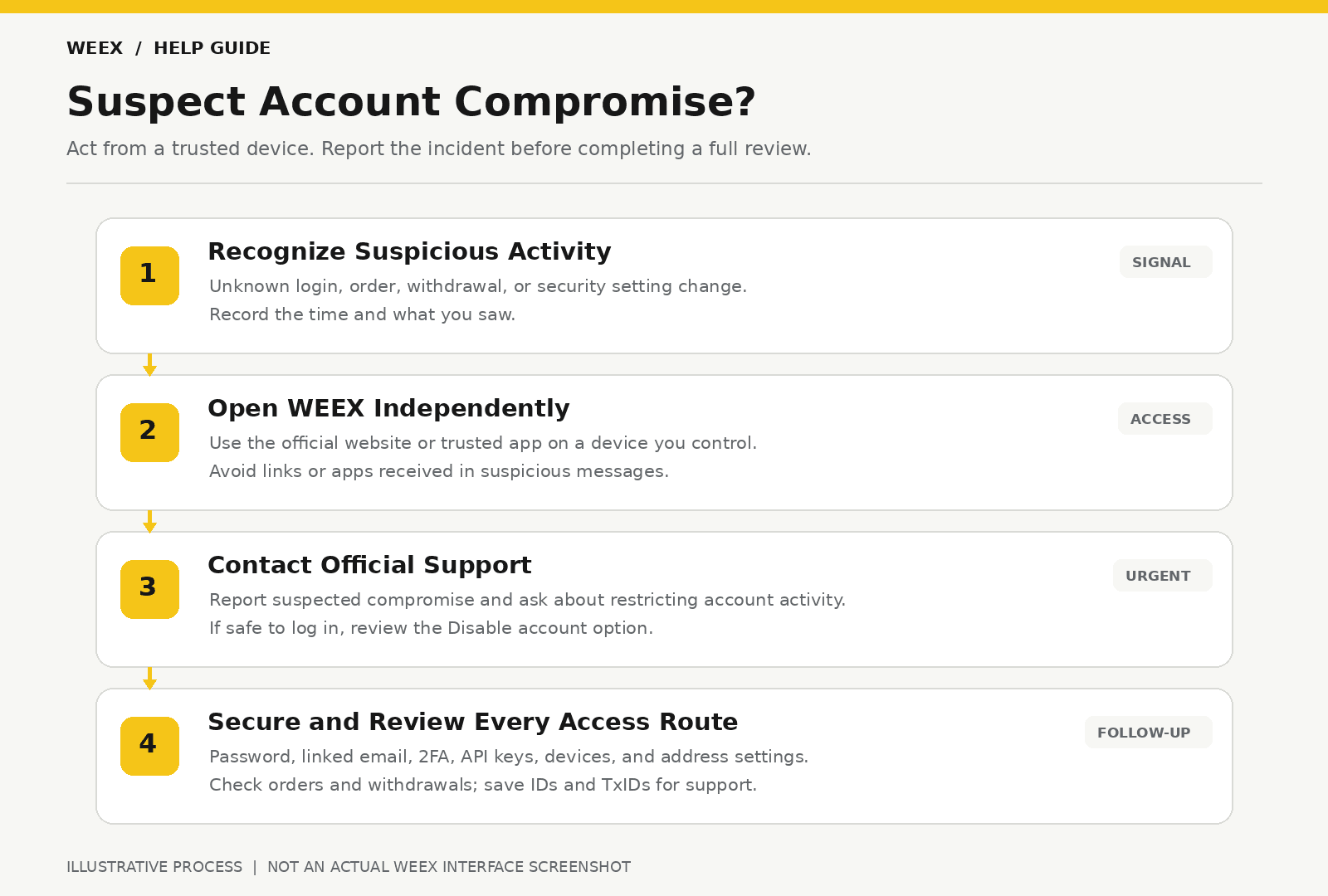
If you suspect unauthorized access to your WEEX account, open the official WEEX website or app from a device you trust and contact WEEX support immediately. Ask for help restricting account activity while the incident is reviewed. If you can still access the account safely, change your password, secure your linked email and verification methods, remove unfamiliar API keys, and inspect login, trading, and withdrawal records. If you cannot log in, use official support without waiting to regain access.
The order matters because an account compromise can involve more than a password. Someone may also have access to your email, an active session, a verification method, or an API key. Work from a trusted device, report the incident promptly, and check each access route rather than assuming one password change resolves everything.
What Should I Do in the First Few Minutes?
Start by separating what you know from what you suspect. An unfamiliar login notification, an order you did not place, a new withdrawal address, or a withdrawal you did not authorize each deserves prompt attention. You do not need to determine exactly how access was obtained before requesting help.
Take these actions in order:
- Stop using a suspicious link or app. Open WEEX directly through the official website or an app you already trust. If you installed an unfamiliar app or entered credentials on a suspicious page, switch to a device you trust for the remaining steps.
- Contact official WEEX support immediately. State that you suspect account compromise and ask what account restrictions can be applied while the case is reviewed. Include your UID or another account identifier requested through the official support flow.
- If you can safely log in, review Security settings. Change your login password, inspect account activity and connected devices, and check your verification methods.
- Secure connected access. Review API keys, linked email access, withdrawal addresses, and any unfamiliar account settings.
- Check asset activity. Inspect open orders, trade history, internal transfers, and withdrawal history. Record any action you did not authorize.
WEEX’s security alert on impersonation advises users who notice unusual activity to change their password and contact customer support. Reporting promptly is important even when you are still investigating the cause.
If you see an active withdrawal you did not request, tell support that clearly at the start of the conversation. A transaction’s current stage determines what actions, if any, are still available.
Can I Temporarily Disable My WEEX Account?
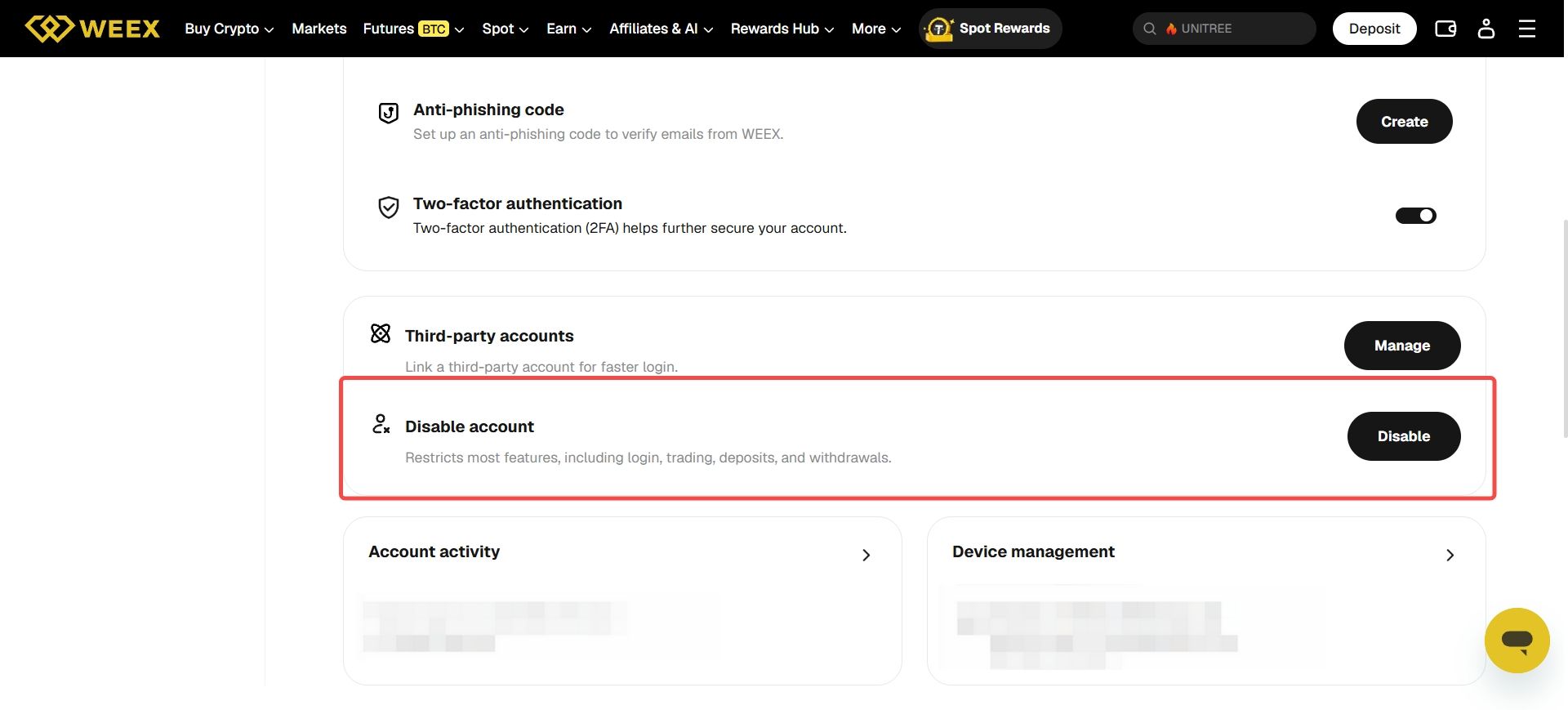
The WEEX Security settings page lists a Disable account option and describes it as restricting most features, including login, trading, deposits, and withdrawals. If you can safely access the official settings page, review the instructions presented for that option. Be aware that disabling the account can also prevent you from logging in while it is restricted.
Contact support at the same time and explain whether you have already used the setting. If you cannot log in, or are unsure what it will do to an open position or pending request, ask support to guide the account restriction process. Do not rely on a password change alone as confirmation that all existing access and activity have been stopped.
WEEX’s account terms instruct users who discover unauthorized use of their account or credentials to inform the platform promptly and request a temporary suspension of account services. The support team can assess your specific account and explain the next steps. An account restriction cannot reverse a blockchain withdrawal that has already been sent.
What If I Can Still Log In to WEEX?
Use a trusted device and visit WEEX directly. In Security settings, change the login password to one you do not use elsewhere. Then inspect account activity or login history for devices and times you do not recognize. WEEX’s account guide directs users to Security → Login history and advises contacting customer service when an unfamiliar device appears.
Next, check the linked email account. If another person can read that inbox, they may see account notices or password-reset messages. Change the email password from a trusted device and review its own recent activity and recovery settings. Also review any phone or authenticator method linked to WEEX. If you believe a verification method was exposed or you cannot access it, tell WEEX support before attempting changes you do not understand.
Inspect API Management even if you have not noticed an unfamiliar website login. API keys can authorize account actions without appearing as an ordinary interactive login. Delete keys you do not recognize and any key you believe was exposed. The WEEX account security guide covers API keys, verification methods, withdrawal address controls, and the actions to take when an account may already be compromised.
Finally, review withdrawal address entries and any whitelist settings available in your account. Record an unfamiliar entry before removing it, if doing so is safe, so you can describe it to support. Do not delay urgent support contact while collecting a complete history.
What If I Cannot Log In?
Use the official WEEX Help Center from a trusted device and report the suspected compromise. Give the account identifier you know, such as your UID, registered email address, or phone number, through the official support flow. Explain whether the password was changed unexpectedly, your verification method stopped working, or you saw unauthorized activity before losing access.
You can also review WEEX’s login troubleshooting guide to distinguish a forgotten password, unavailable verification code, or locked account. However, if you suspect another person has access, label the request as an account security incident rather than only a routine login problem. Ask support about restricting activity while your identity and account status are checked.
Do not send identity documents to a person who messages you first claiming to be support. Submit any documents only through an official process after confirming the request. Never share a password, one-time code, fund code, recovery phrase, API secret, or private key.
What If I See an Unauthorized Withdrawal?
Open Withdrawal History and record the asset, network, amount, destination address, submission time, status, and withdrawal ID if shown. Check whether the request has a transaction hash, also called a TxID.
If an unrecognized request is still in the WEEX order details and shows One-Click Cancel, use the available option and confirm that the status changes to canceled. WEEX’s withdrawal product update says eligible withdrawals that have not yet been sent on-chain can be canceled from the order details page. Report the incident to support even if cancellation succeeds, because the account access issue still needs attention.
If there is no Cancel option, contact support immediately with the withdrawal ID and current status. The lack of a visible TxID does not guarantee that support can stop a request while it is processing.
If a TxID exists, check the blockchain transaction and provide it to support. A broadcast blockchain transfer cannot be recalled by changing your WEEX password or deleting its destination address. Preserve the transaction details for the investigation.
What If I See Trades or API Activity I Did Not Authorize?
Check open orders, order history, fills, positions, and recent transfers. Record the affected asset or trading pair, approximate time, order ID where available, and what you did not recognize. Tell support whether any API key or connected trading tool may have been involved.
If you find an unfamiliar API key, delete it through the official account interface if you can do so safely. WEEX’s API key security guide recommends removing a suspect key promptly, then reviewing open orders and trading history. A password reset should not be treated as a substitute for checking API access.
An unauthorized order or position may still affect your account while the security case is being reviewed. Examine its current status and risk before changing it. If you cannot safely assess an open Futures position, tell support what the interface shows and request guidance promptly.
Do not move assets to an address supplied by someone who claims it is a “safe wallet.” Use only actions you initiate through the official account and support channels.
How Do I Report a Compromised WEEX Account Effectively?
An initial report can be short. Its purpose is to identify the account, describe the urgent concern, and enable support to review current activity. You can provide further evidence afterward.
Include:
| Information | Useful Detail |
|---|---|
| Account identifier | UID or registered contact information requested through the official flow |
| First sign of trouble | Unfamiliar login, changed setting, unknown order, or unrecognized withdrawal |
| Approximate time | Include the date and time zone if you know them |
| Current access | Whether you can still log in from a trusted device |
| Urgent transaction | Withdrawal or order ID, asset, amount, status, and TxID if one exists |
| Actions already taken | Password changed, API keys deleted, account disabled, or other relevant steps |
| Evidence | Screenshots of alerts and records, with unnecessary personal data concealed |
A useful opening message is:
“I suspect unauthorized access to my WEEX account. My UID is [UID]. I first noticed [event] at [time and time zone]. I [can/cannot] log in. An unrecognized [withdrawal/order/settings change] shows [status and ID]. Please help restrict account activity and tell me what information you need to review this incident.”
Use screenshots to show the exact status or alert, but never include passwords, one-time codes, recovery phrases, private keys, or API secrets. Keep the original emails or notifications available rather than relying on a cropped image alone.
How Can I Tell Whether a Support Contact Is Official?
Start the conversation yourself through the WEEX website or app. If someone contacts you through a message, email, or social account claiming to be WEEX staff, independently check the contact before replying. The WEEX official verification page provides a route to verify contacts and links.
A legitimate account-security review does not require you to disclose a password, one-time verification code, fund code, wallet recovery phrase, or private key to a person in chat. Do not transfer funds to “unlock,” “verify,” or “protect” your account at someone else’s direction.
If the compromise began with a connected self-custody wallet and you signed a token approval, address that approval through the wallet and relevant network as well. Changes to your WEEX login do not revoke an on-chain approval you granted from a separate wallet.
WEEX Editorial View: Report First, Then Close Each Access Route
A suspected compromise calls for prompt official support contact and a methodical account review. If you can safely enter your account, check the available restriction control, change credentials, secure the linked email and verification methods, remove suspect API keys, and inspect orders and withdrawals. If you cannot log in, report the security concern immediately through official support. Keep the timeline and transaction records together so the support team can assess the specific activity you did not authorize.
FAQ
1. What Should I Do First If I Think My WEEX Account Was Hacked?
Contact official WEEX support immediately from a trusted device and explain the suspected unauthorized access. If you can safely log in, inspect the account restriction option and begin securing your password, email, verification methods, API keys, and activity records.
2. Can I Freeze My WEEX Account Myself?
The official Security settings page lists a Disable account option that restricts most features, including login, trading, deposits, and withdrawals. Review the instructions shown in your account and contact support about the incident. If you cannot log in, ask support about the available restriction process.
3. Is Changing My WEEX Password Enough?
No single step should be assumed to resolve every access route. Check your linked email, verification methods, account activity, API keys, withdrawal settings, and any unauthorized transactions. Report the incident even if you have successfully changed the password.
4. Can WEEX Stop an Unauthorized Withdrawal?
An eligible request may show One-Click Cancel before it is sent on-chain. Check its order details and contact support immediately. Once a blockchain transfer is broadcast, changing account settings cannot reverse it.
5. What Information Should I Send to WEEX Support?
Provide an account identifier requested through the official flow, the time and description of the suspicious activity, relevant order or withdrawal IDs, and a TxID if one exists. Include useful screenshots, but never share passwords, verification codes, API secrets, or wallet recovery phrases.
Recommended Articles

Gainers


