


Why Is My WEEX Deposit Suspended, and When Can I Deposit Again?
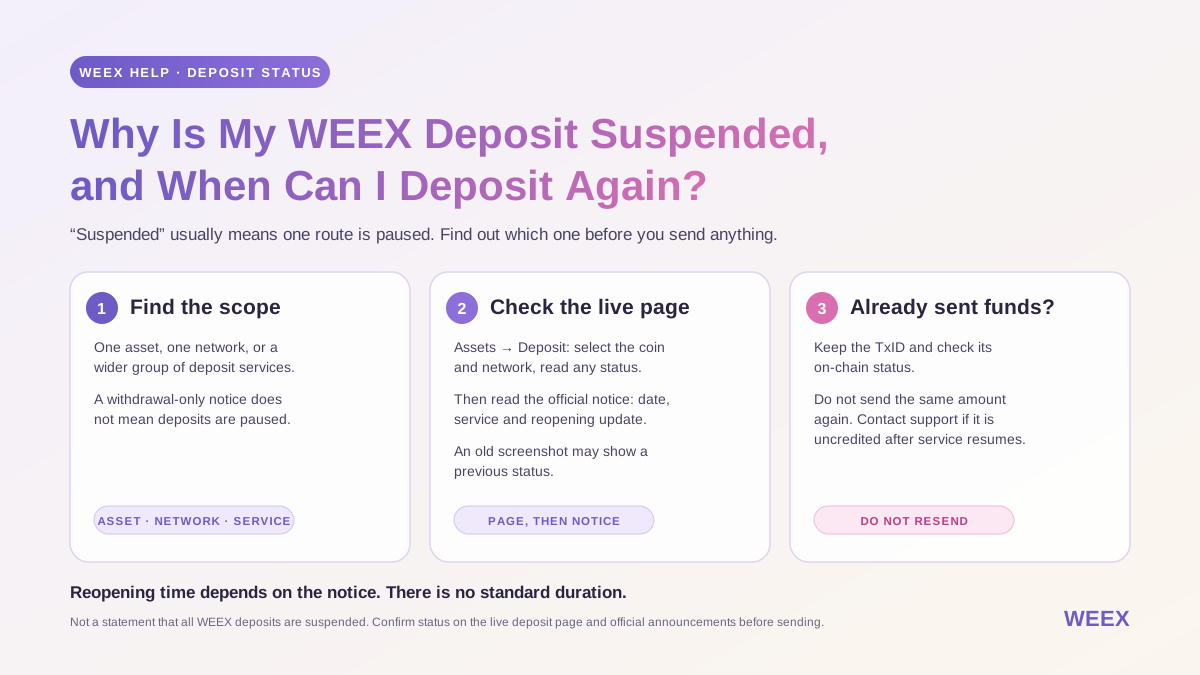
Why Is My WEEX Deposit Suspended, and When Can I Deposit Again?
A WEEX deposit marked “suspended” or “temporarily unavailable” means the selected asset or network is not currently accepting deposits through that route. Check the status on the WEEX deposit page and look for an official announcement about the affected asset or network. Do not send funds to a saved address while deposits are suspended. If you already sent a transfer, keep its TxID, check its on-chain status, and contact WEEX support if it does not appear after service resumes.
A deposit suspension is often limited in scope: it may affect one network, one asset, or a broader group of deposit services. The key is to identify exactly what has been paused before deciding what to do next. An announcement about withdrawals alone, for example, does not necessarily mean deposits are unavailable.
What Does “Deposit Suspended” Mean on WEEX?
“Deposit suspended” means WEEX has temporarily paused the deposit function for the affected asset or network. During that period, you should not initiate a transfer through the suspended route. A transaction sent from an external wallet can still be recorded on a blockchain, but that does not mean WEEX is currently able to process and credit it.
WEEX has published suspension notices for different operational reasons, including wallet maintenance, network upgrades, and checks needed after unusual network activity. For example, its BDX deposit and withdrawal suspension notice describes pausing those services while wallet and technical teams checked network data. That notice concerns a particular asset and event; it is not a statement that all WEEX deposits are suspended.
A service notice should tell you what is affected. Read it alongside the current deposit page rather than inferring the status of every network from a single headline.
| Status You Encounter | What to Check |
|---|---|
| Deposits suspended for one asset | Whether another asset you intend to use has an available deposit route |
| One network suspended for an asset | Whether WEEX and the sending service both support another currently available network for that same asset |
| Deposits and withdrawals suspended | The notice’s scope and subsequent reopening update |
| Deposit available, withdrawal suspended | The deposit page’s current status; the withdrawal notice may concern a separate function |
| Sending transaction pending | The sender’s status; it may not yet have been broadcast |
Never switch networks simply because one is unavailable. Both the sending platform and WEEX must support the same network for the asset, and you must use the deposit address and any Memo or Tag shown for that selection.
Why Would WEEX Temporarily Suspend Deposits?
A temporary pause can allow WEEX to carry out maintenance or verify that an affected network is ready for reliable deposit processing. The reason and scope should come from the applicable announcement, not from a generic assumption about every “suspended” label.
For instance, an earlier maintenance notice said deposit and withdrawal channels for certain cryptocurrencies could be temporarily suspended or experience delayed crediting during an upgrade. Another asset-specific notice described checks of node synchronization and balances following a network incident. In both cases, the details of the specific notice determine what users should expect.
A pause can also be separate from trading availability. A notice may say that deposits and withdrawals are suspended while trading continues. Existing account balances and the ability to bring in new assets are different functions. Check each function’s current status before acting.
How Do I Check Whether WEEX Deposits Are Available?
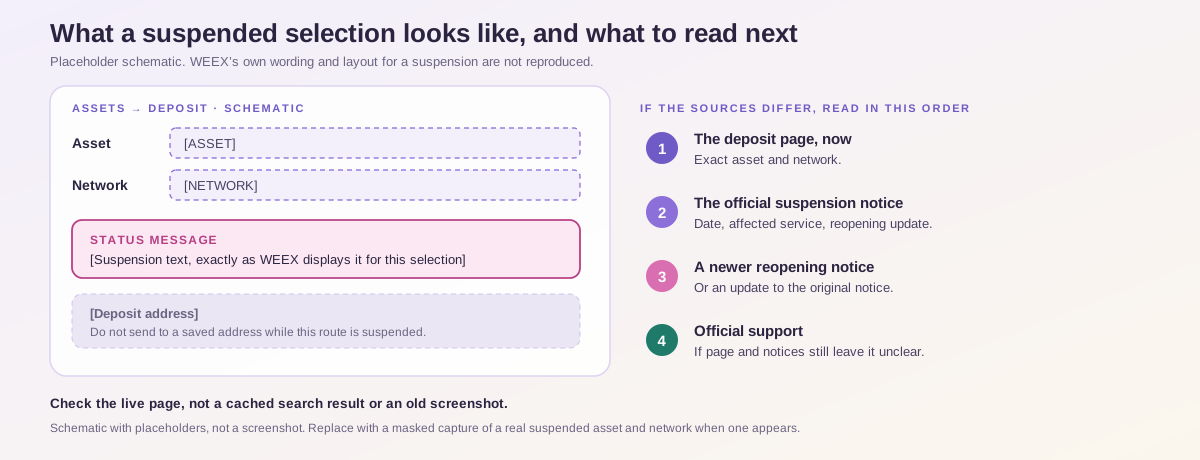
Open the official WEEX website or app, log in, and go to Assets → Deposit. Select the coin and network you plan to use. Check whether the deposit function is available and read any status message shown for that selection. WEEX’s deposit guide describes selecting the asset and network before copying the address, which also gives you the right point to check the current instructions.
Next, look for a notice in the WEEX Help Center that names the asset and network. Read the date, affected service, and any reopening update. A notice titled “withdrawal suspension” may leave deposits unaffected; an older suspension notice may have been followed by a resumption announcement.
Use this order when the sources appear to differ:
- Check the deposit page for the exact asset and network now.
- Read the most relevant official suspension notice.
- Look for a newer official reopening notice or an update to the original notice.
- Ask official support if the live page and announcements still leave the status unclear.
A cached search result or an old screenshot may show a previous status. Check the live deposit interface before sending.
When Will a Suspended WEEX Deposit Reopen?
The reopening time depends on the specific maintenance or network issue. If the official notice gives an estimated time, treat it as an estimate and check for an update. If it says the time will be announced separately, there is no confirmed reopening time in that notice.
WEEX’s maintenance announcement stated that reopening would be announced after the upgrade’s progress was assessed. Its BDX resumption notice illustrates how an affected service can be announced as restored after the relevant checks are complete. These are past examples of the announcement process, not schedules for a suspension happening now.
Before sending after a reopening announcement, revisit Assets → Deposit and select the asset and network again. Confirm that deposits are enabled and copy the current address and any required Memo or Tag. The reopening of a service does not make an old screenshot a reliable set of deposit instructions.
I Already Sent Funds During a WEEX Deposit Suspension. What Should I Do?
First, establish whether a blockchain transaction actually exists. Open the sending wallet or exchange and check its transfer status.
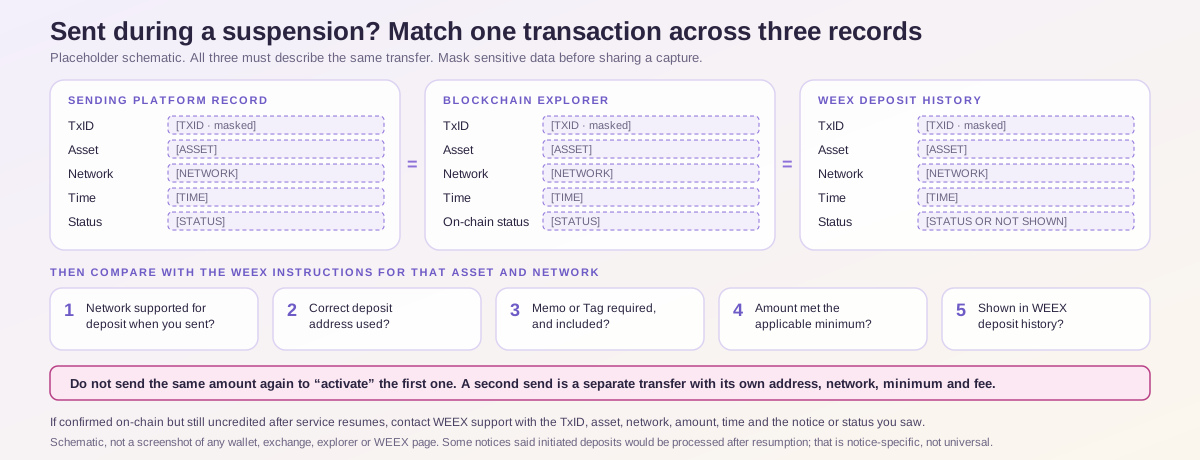
If the sender still shows the withdrawal as pending and provides no TxID, contact the sender about its status. If it has produced a TxID, inspect the transaction on the relevant blockchain explorer. Record whether it was broadcast, whether it is confirmed, which network it used, the destination address, and the amount.
Then compare the transfer with the WEEX deposit instructions for that asset and network:
- Was the network supported for deposits when you initiated the transfer?
- Did you use the correct deposit address?
- Did the deposit require a Memo or Tag, and was it included?
- Did the amount meet the applicable minimum?
- Does the transaction appear in your WEEX deposit history?
A transaction may remain uncredited while service for its route is suspended. Some WEEX suspension notices have said already initiated deposits would be processed after service resumed, but that wording applies to the particular service and notice. It should not be read as a universal promise for every asset, address, or incorrectly routed transaction.
If your transfer is confirmed on-chain but has not appeared after the relevant service resumes, contact WEEX support. Provide your account identifier as requested through the official support flow, the asset, network, amount, sending time, TxID, and the notice or status message you saw. WEEX’s delayed-deposit checklist provides further checks for a transaction that has not been credited.
Do not send the same amount again to try to “activate” the first transaction. A second send is a separate blockchain transfer, with its own address, network, minimum, and potential fee.
Can I Use Another Network While One WEEX Deposit Network Is Suspended?
Only if the asset is supported for deposits on another network and the sending wallet or exchange supports that exact same route. Check the currently available options in WEEX before making any new transfer. Select the alternative network on both sides, then use the address and any required Memo or Tag generated for it.
For example, the fact that two networks can carry a token with the same symbol does not make their deposit addresses interchangeable. Sending on an unsupported or mismatched network is a different issue from waiting for a suspended service to reopen. WEEX’s wrong-chain and wrong-token guide explains why matching the token and chain matters.
If no suitable route is available, wait for the affected deposit service to resume. Do not use an address copied for another network, an address from an old message, or a third party’s account to bypass a suspension.
Is a Deposit Suspension the Same as a Withdrawal Restriction?
No. Deposit availability, withdrawal availability, and account-specific restrictions should be checked separately.
A deposit suspension concerns the ability to receive an asset through a stated route. A withdrawal suspension concerns sending an asset out of WEEX through a stated route. An account-specific restriction may apply to a particular user rather than the deposit service as a whole. The label shown in your account and the wording of the relevant notice help distinguish them.
This is why the existing “Why Can’t I Deposit or Withdraw on WEEX?” article should not be treated as a current general explanation of deposit maintenance: it discusses a specific withdrawal restriction following certain account security operations. For a deposit marked suspended, start with the affected asset and network on the live deposit page.
If you cannot determine which situation applies, send support the exact error or status text rather than saying only that “transfers are unavailable.”
WEEX Editorial View: Check the Scope Before Sending
The word “suspended” calls for one decision first: pause the planned transfer and identify the affected asset, network, and service. WEEX’s live deposit page and official announcements provide that context. If a transaction was already sent, preserve its TxID and check its on-chain progress; then review the current status and contact official support with the full details if the deposit remains uncredited. This gives support a specific transfer to investigate and helps you avoid creating a second issue while the first is unresolved.
FAQ
1. What Does “Deposit Suspended” Mean on WEEX?
It means deposits through the affected asset or network route are temporarily unavailable. Check the selected coin and network on the live WEEX deposit page and read any relevant official announcement to confirm the scope.
2. How Long Will a WEEX Deposit Suspension Last?
There is no standard duration for every suspension. Check the relevant notice for an estimate or a statement that reopening will be announced separately, and confirm availability on the deposit page before sending.
3. Will My Deposit Be Credited If I Sent It Before the Suspension?
It depends on the transaction and the applicable service notice. Keep the TxID, verify the network, address, amount, and any Memo or Tag, and check your WEEX deposit history. Contact support if it remains uncredited after the relevant service resumes.
4. Can I Deposit Through Another Network While One Is Suspended?
You may use another route only when WEEX currently supports deposits for that asset on the alternative network and the sender supports the same network. Select it on both platforms and use the deposit instructions WEEX displays for that route.
5. Where Can I See That WEEX Deposits Have Resumed?
Check Assets → Deposit for the affected asset and network, then look for an official reopening update in the WEEX Help Center. The live deposit status should be checked before you initiate a new transfer.
Recommended Articles

Gainers


